


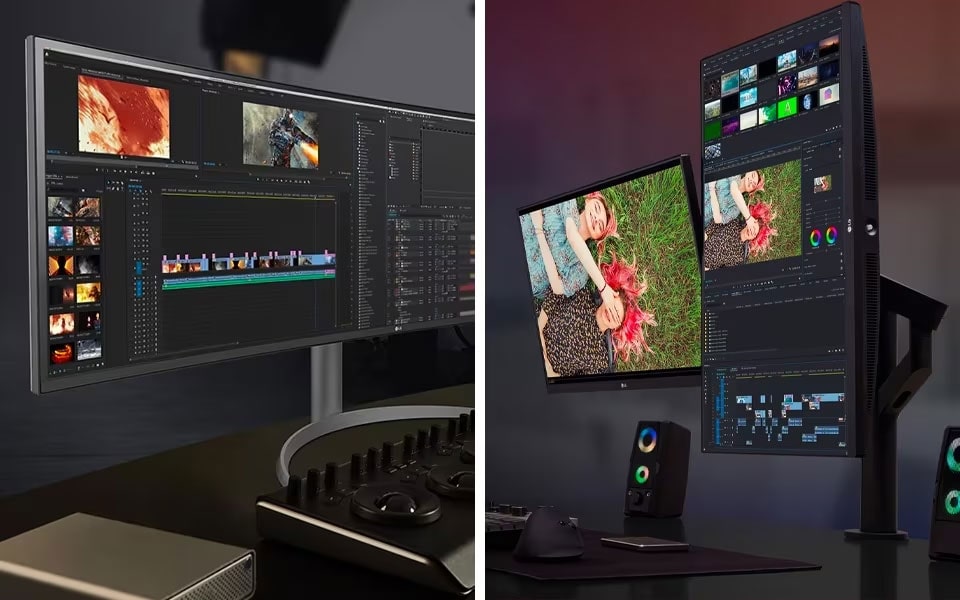
 In today's digital world, having more screen real estate has become almost essential for both work and play. Whether you're a professional multitasker, a gamer, or a content creator, the right display setup can dramatically improve your efficiency and overall experience. Two popular options for expanding your desktop are ultrawide monitors and dual monitor setups. While both offer expansive screens, each comes with its own set of advantages and considerations. In this article, we’ll dive into the ultimate comparison of ultrawide versus dual monitor setups to help you determine which one is best for your needs.
What Is an Ultrawide Monitor?
An ultrawide monitor is a single, large screen with a 21:9 aspect ratio, offering much more horizontal space than a traditional 16:9 monitor. It’s designed to provide an immersive viewing experience, ideal for gaming, movie watching, and multitasking. Ultrawide monitors come in various sizes, typically ranging from 34 inches to 49 inches, with curved screens being a common feature to enhance the viewing experience. This setup can give you the feeling of a multi-monitor workspace without the need for multiple physical displays.
What Is a Dual Monitor Setup?
A dual monitor setup involves using two separate monitors side by side, each with its own screen. This setup has been popular for years among professionals who need extra screen space to increase productivity. It’s ideal for multitasking, allowing you to have multiple programs open on different screens simultaneously. Dual monitors come in a variety of sizes and resolutions, and unlike ultrawide setups, each monitor in a dual setup is usually a separate piece of equipment
Understanding Ultrawide Monitors: Pros and Cons
Ultrawide monitors have gained popularity in recent years due to their immersive viewing experience. These monitors typically come in a 21:9 aspect ratio, offering a much wider field of view compared to standard monitors. While they are excellent for multitasking, gaming, and content creation, they also have some drawbacks to consider.
The Pros of Ultrawide Monitors
Immersive Experience:
Ultrawide monitors offer a wide and panoramic screen that fills your field of vision. This is particularly appealing for gamers and movie enthusiasts who want to feel fully immersed in their content.
Space Efficiency:
With an ultrawide monitor, you have the equivalent of two standard monitors in a single display. This can be a great way to declutter your desk while still maintaining plenty of screen real estate for multitasking.
Seamless Multitasking:
Since an ultrawide monitor is essentially one large display, it offers a smoother multitasking experience without the bezel interruptions you get with a dual monitor setup. You can have multiple windows open side by side with no distractions.
The Cons of Ultrawide Monitors
Expensive:
Ultrawide monitors tend to be on the pricier side, especially if you opt for models with high refresh rates or advanced features like curved screens. They might not fit into everyone’s budget.
Desk Space Requirement:
While ultrawide monitors save space compared to dual monitor setups, they are still large and require significant desk space. If you have a small desk, this could be an issue.
Compatibility Issues:
Certain programs and games may not fully support ultrawide resolutions. This can lead to stretched images or black bars around the screen. Additionally, older software may not take advantage of the extra screen real estate.
The Advantages of Dual Monitor Setups
Dual monitor setups are a tried-and-true solution for people who need more screen space for work, gaming, or creative tasks. With two separate monitors, users can easily multitask, keeping various programs or windows open simultaneously. Here’s a closer look at the advantages of dual monitor setups.
The Pros of Dual Monitors
Versatility and Flexibility:
Dual monitors allow you to customize your workspace to your needs. Whether you want to have your email open on one screen while you work on a project on the other, or use one monitor for gaming and the other for browsing, the possibilities are endless.
Cost-Effective:
Compared to ultrawide monitors, dual monitor setups are often more affordable. You can purchase two smaller monitors for a similar price to one high-end ultrawide screen, especially if you already have a compatible setup.
Easy Upgrade Path:
With a dual monitor setup, you can start with one screen and easily add another when you need more space. This scalability makes dual monitors a good option for users who may not need a massive screen at first but want the ability to expand.
The Cons of Dual Monitors
Bezels:
One of the most significant drawbacks of dual monitors is the bezel in the middle of the screens. The interruption can be distracting for some users, especially when you’re trying to move windows between screens.
Desk Space:
Like ultrawide monitors, dual monitors require a significant amount of desk space. If you have a smaller workspace, fitting two monitors may be a challenge.
Cable Management:
With two monitors, you have twice as many cables to manage, which can lead to a cluttered desk. Keeping cables organized and tidy requires extra effort.
Ultrawide vs. Dual Monitor: Which Is Best for You?
Both ultrawide and dual monitor setups have their strengths, and the best choice depends on your specific needs and workspace. Here’s a breakdown of which setup might be the best fit for you.
Choose an Ultrawide Monitor If:
You Want an Immersive Experience: If you're into gaming or watching movies and want a more immersive experience, an ultrawide monitor is a great option. The panoramic display makes you feel more engaged in whatever you're doing.
You Prefer a Clean, Streamlined Desk: If you like the idea of having a large, wide screen without the clutter of multiple monitors and bezels, an ultrawide display will keep your desk looking neat and organized.
You Do a Lot of Video Editing or Content Creation: Ultrawide monitors are fantastic for video editing, graphic design, and other creative tasks. The extra screen real estate allows you to keep multiple editing tools open without feeling cramped.
Choose a Dual Monitor Setup If:
You Want More Flexibility: A dual monitor setup offers more customization. You can choose two monitors with different sizes or resolutions and place them at different angles to suit your needs.
You’re on a Budget: If you're looking to expand your workspace without breaking the bank, a dual monitor setup is more affordable than most ultrawide options. You can even use existing monitors to build your setup.
You Need the Ability to Multitask in Various Ways: A dual monitor setup gives you more control over how you organize your workspace. You can have your email, work documents, and research on one monitor while you do something else on the other.
Conclusion
When deciding between an ultrawide monitor and a dual monitor setup, the key is to think about how you work, your budget, and the space available on your desk. If you’re looking for a more immersive experience or work in creative fields, an ultrawide monitor might be the right choice. However, if you prefer flexibility, cost-effectiveness, and don’t mind dealing with bezels, a dual monitor setup could be the perfect fit.
FAQs
Which is better for gaming: ultrawide or dual monitors?
Ultrawide monitors are generally better for gaming, offering a more immersive experience with a wider field of view. Many games support ultrawide resolutions, providing a panoramic view that enhances gameplay.
Do dual monitors provide better productivity than ultrawide?
Dual monitors can be more productive for some users, especially if they like having different applications or projects open on separate screens. It allows for easier multitasking and customization of the workspace.
Are ultrawide monitors more expensive than dual monitor setups?
Yes, ultrawide monitors tend to be more expensive than dual monitor setups, particularly if you’re opting for larger or higher-end models. However, dual monitor setups can also add up in cost depending on the monitors chosen.
Can I use a dual monitor setup for creative work?
Yes, a dual monitor setup is ideal for creative work, allowing you to keep your editing software open on one screen while viewing your project on the other. It provides flexibility for organizing tools and references.
Do dual monitors require more space than ultrawide monitors?
Yes, dual monitors typically require more desk space since you need to place two separate displays side by side. Ultrawide monitors save space by combining the functionality of two screens into one large display.





